How to Take Online Bookings and Payments for Your Classes in India

How to set up online class booking and payments in India

Swap your WhatsApp chats for one booking page. It shows your schedule, takes UPI and card payments at checkout, and sends confirmations without you lifting a finger. Getting online class booking and payments working takes three moves: build the class page with schedule, capacity and pricing, connect a payment gateway whose fees you understand, then sort out cancellations, attendance and reporting.
Before you start, have four things ready:
- Your class details: what you teach, who it's for, the level, and how long it runs (for example, 60 or 90 minutes).
- Your pricing model: drop-in, packs, or memberships, with a rupee price for each.
- A bank account that can receive UPI and card payouts.
- A written cancellation policy with a cutoff, such as 24 hours, even if it's only a draft.
Step 1: Build a class page with online class booking and payments, no back-and-forth chats
Build one public class page that does the work your chats do now. Taking bookings only on WhatsApp works with 5 students and breaks at 30. Messages get missed, two people land in the same spot, and you match UPI screenshots by hand with no record of who attended or who has paid.
An online booking system is software that shows your schedule, holds a spot, collects payment, and records the booking in one step. A good one manages:
- your class page, schedule, and capacity limits
- pricing and payments
- automatic confirmations
- attendee details and attendance
- cancellations and refunds
- reporting
Create a professional class or workshop page
Give each class a clear title, such as "Beginner acrylic painting, 6-week batch." Then add what students will learn, who it's for, the level, the duration, and the venue or online link. Finish with what to bring, a short host bio, 3 to 5 photos, and your cancellation policy in plain language, so students get answers without messaging you.
Add schedules, capacity and pricing options
Choose single workshops or recurring weekly batches, and set a seat cap for each session, for example 12 seats. The hard cap matters because your venue has a size limit and your teaching quality depends on how many students each instructor handles. When a session sells out, turn on a waitlist.
Before you pick a tool, write down "what I teach and how I charge." Then check that the tool supports that model. For example, Calendly's Payments FAQ explains that Calendly collects payment through Stripe or PayPal, and Calendly lists support for prepaid packages, custom payment links, and coupon codes. Acuity Scheduling offers appointment packages, including payment plans, on its higher tiers, and G2's 2026 listing shows its Growing plan adds memberships.
| Pricing model you need | Example feature to look for |
|---|---|
| Drop-in price | Single paid booking per session |
| Class pack | Prepaid packages (Calendly), appointment packages (Acuity Scheduling) |
| Monthly membership | Memberships (Acuity Scheduling Growing plan, G2 2026) |
| Early-bird offer | Coupon codes (Calendly) |
On Zoozhi, hosts list in-person and recurring sessions with instant online booking, and host partners pay no upfront listing fees.
Every extra pricing option adds setup time and support questions. Start with 1 drop-in price and 1 class pack.
Step 2: Accept UPI, cards and other payments, and know what you'll really pay
Expect to pay roughly 2% per transaction for UPI on major gateways, plus whatever your booking tool charges. A payment gateway is the service that moves money from a student's bank or card to your account. Tools like Calendly and Setmore connect to a gateway such as Stripe rather than hold your money themselves.
Compare gateway fees
MDR (merchant discount rate) is the fee banks charge merchants on each transaction. Razorpay says standard bank-to-bank UPI and RuPay debit transactions carry zero MDR, but it still applies a 2% platform fee. Stripe charges 2% per successful UPI charge, with an extra 1.5% on international transactions.
| Fee item | Razorpay | Stripe |
|---|---|---|
| UPI / RuPay debit MDR | Zero MDR | Not stated separately |
| Platform / processing fee on UPI | 2% | 2% per successful charge |
| International transactions | Check rate card | +1.5% |
| Cards | 2% on successful payments | US reference: 2.9% + 30¢ |
| Settlement | T+1 or instant | Check India terms |
For cards, Stripe's US pricing is 2.9% + 30 cents per successful domestic transaction, with 1.5% extra for international cards. Use that as a reference point only, and check Stripe's India rate card before you commit.
Razorpay deducts its fee and GST from each payment at source and settles the rest to your bank, typically on a T+1 (next working day) or instant cycle.
Separate tool fees from gateway fees
Some booking tools add no fee of their own:
- Setmore charges no transaction fees of its own, so only your payment provider's standard rates apply. Its $0 free plan includes accepting payments and a branded booking page.
- Calendly sends money straight to your Stripe or PayPal account and doesn't hold it.
Subscriptions are a separate cost:
- Calendly Standard costs $10 per seat per month.
- Acuity Scheduling runs $16 (Starter), $27 (Standard), and $55 (Premium) a month on annual billing. It offers a 7-day free trial and, per G2's Acuity Scheduling pricing listing for 2026, no permanent free tier.
- Zoho Bookings has a forever-free plan for 1 user, but payment gateways aren't included in it. Its paid plans cost US$6 (Basic) and US$9 (Premium) per user per month on annual billing.
| Tool | Entry paid price | Free tier | Payments on free tier |
|---|---|---|---|
| Setmore | Not listed here | Yes, $0 | Yes |
| Calendly | $10/seat/month (Standard) | Not covered here | Payments sit in Standard |
| Acuity Scheduling | $16/month (Starter, annual) | No, 7-day trial | No free tier |
| Zoho Bookings | US$6/user/month (Basic, annual) | Yes, 1 user | No gateways |
The pattern to watch for: free tiers often leave out payments.
Work out your real monthly cost
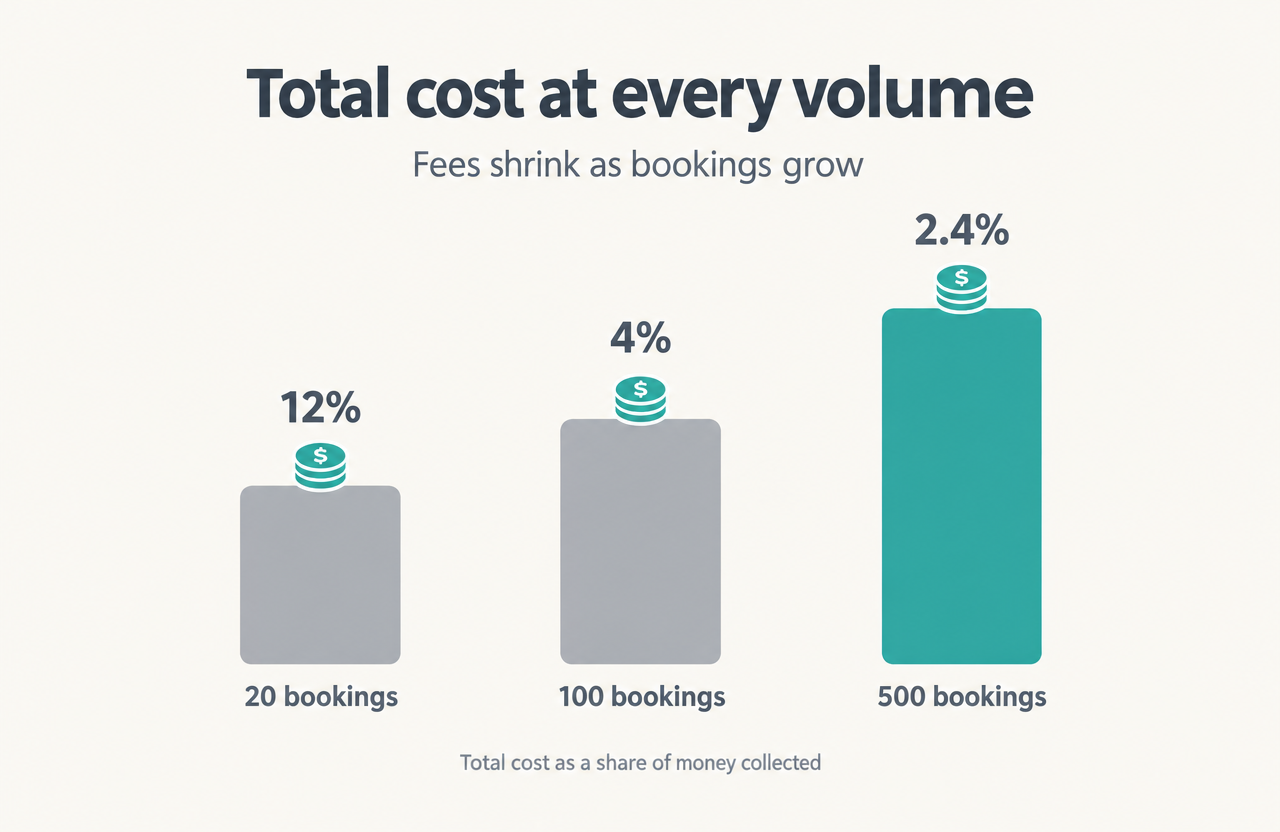
For example, suppose you take 100 bookings a month at Rs 500 each, pay a 2% gateway fee, and pay Rs 1,000 a month for your booking tool.
- 100 bookings: gateway fees come to Rs 1,000. Your total cost is Rs 2,000 on Rs 50,000 collected, or 4%.
- 20 bookings: fees are Rs 200, so you pay Rs 1,200 on Rs 10,000, or 12%.
- 500 bookings: fees are Rs 5,000, so you pay Rs 6,000 on Rs 2,50,000, or 2.4%.
In this example, the flat Rs 1,000 subscription hurts most at 20 bookings, and the 2% fee takes over at 500.
Handle failed payments, GST and confirmations
A failed payment should never hold a seat. In Calendly group events, the booking isn't completed if payment fails, and the student can retry with another payment method. Gateway fees also carry GST, according to Razorpay, so check your GST registration and invoicing needs with an accountant.
Set up automatic confirmations that include the date, venue, a map link, and your policy, plus a reminder 24 hours before class. Those 2 messages cut out most "where do I go?" chats. Zoozhi offers instant online booking with no hidden fees, QR ticket scanning at venue entry, and weekly payouts to host partners, so your online class booking and payments run from one place.
Step 3: Run the class day and the money after it from one system

Keep attendance, refunds, and reporting in the same system that took the booking. When everything lives in one place, you skip rebuilding records in a spreadsheet at month-end.
Manage attendee information and attendance
At booking, collect each student's name, phone number, and any health or experience-level notes. On the day, check people in at the door against a live attendee list. Zoozhi's QR ticket scanning handles venue entry by scanning each guest's ticket.
Handle cancellations, refunds and rescheduling
Write your policy before the first booking comes in. It should cover:
- the cancellation cutoff, such as 24 or 48 hours
- whether you give refunds or credits
- what happens when you cancel a class
- how you handle no-shows
Strict policies protect your revenue but cost goodwill. Credits keep the money with you but frustrate some students. Offering a move to another session in the same week often works best, because you keep the revenue and issue fewer refunds.
Find out where refunds happen in your tool. With Calendly, refunds go through Stripe or PayPal, not inside Calendly. Before you rely on a gateway, check whether it returns its fee on a refund, for example on Stripe's local payment methods pricing page. If a student disputes a payment, your confirmation, policy, and attendance record are your evidence.
Track bookings, earnings and returning customers
On the 1st of each month, review bookings per class, revenue after fees, fill rate, and repeat attendees. A class filling 10 of 12 seats with mostly repeat students is your signal to run it weekly and offer a pack.
Move from chats and spreadsheets to one system
- Export your student list from Google Sheets or Excel and your WhatsApp chats.
- Publish your class pages.
- Share the booking link in your WhatsApp group and pin it.
- Pick a date, such as 2 weeks out, after which you stop accepting payment screenshots.
- Review your first 30 days of numbers.
Keep WhatsApp for conversation, not for taking bookings.
To verify success, check 3 things: every booking arrives with a payment and a confirmation, no seat is double-booked, and your monthly report matches what lands in your bank.
How Zoozhi supports classes and workshops
Zoozhi checks host credentials and assesses quality. Hosts run in-person and recurring sessions with instant online booking and QR ticket entry. There are no upfront listing fees, and host partners get weekly payouts.
Next step: list your first class or workshop on Zoozhi as a host partner.
About the author
By Suganthi, Host Success Lead